Show device parameter and value on controller display

Hi all, wondering if a more experienced script writer could help me with the following:
I would like to show the device name, parameter name and value on the display of my Launchkey mk4.
I’ve figured out what the sysex strings should look like and have integrated it in a reaction that listens to a controller knob. The code below works to a certain extent (device number is m1 and parameter number is m13).
The info is sent to the launchkey and displayed on the little screen. However, the reaction is triggered with every midi step of the controller knob. Any idea how I could avoid this? Especially the device name and parameter name should not be retriggered as long as the same midi message is being received. Also, somewhat related, the value is shown as a decimal number between 0 and 1: is it possible to send the value the way it is shown in Ableton (eg. EQ8 frequency in Ableton is ‘x Hz’, while the value sent is ‘0,xxxxxx’)?
Device = str(self.song().view.selected_track.devices[self.get_modifier_value(“m1”)].name)
Parameter = str(self.song().view.selected_track.devices[self.get_modifier_value(“m1”)].parameters[self.get_modifier_value(“m13”)].name)
Value = str(self.song().view.selected_track.devices[self.get_modifier_value(“m1”)].parameters[self.get_modifier_value(“m13”)].value*10)[:3]
self._send_midi((240, 0, 32, 41, 2, 19, 4, 33, 2, 247))
self._send_midi((240, 0, 32, 41, 2, 19, 6, 33, 0) + tuple(Device.encode(“ascii”)) + (247,))
self._send_midi((240, 0, 32, 41, 2, 19, 6, 33, 1) + tuple(Parameter.encode(“ascii”)) + (247,))
self._send_midi((240, 0, 32, 41, 2, 19, 6, 33, 2) + tuple(Value.encode(“ascii”)) + (247,))
self._send_midi((240, 0, 32, 41, 2, 19, 4, 33, 127, 247))

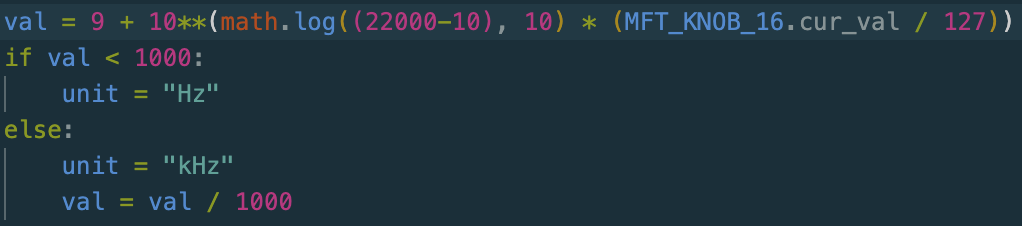
I don’t know how much this will help you with the conversion to Hz, but here’s my attempt (did some searching).
In Python ** means ‘exponent’, so everything inside parentheses after the 2 stars is the exponent of that 10 before the stars. Any number to the exponent of 0 (the lowest value for the exponent here) == 1; that’s why I’ve started the calculation with 9 because we want the minimum to start at 10 Hz.
To calculate the exponent of that 10, we multiply the logarithmic value of (22000 Hz minus the starting value of 10 Hz) with (the value between 0 and 1). In the picture above that value (between 0 and 1) was calculated as the MIDI value of a knob (knob 16 in this case) divided by 127.
The “if-else statement” below that is to convert the unit into “kHz” with once the outcome of that calculation is larger than 999 Hz.
Here’s the code:
import math

knob_value = 1 # replace the 1 with the parameter's value you get from ABLETON

val = 9 + 10**(math.log((22000-10), 10) * knob_value)

if val < 1000:
  unit = "Hz"
else:
  unit = "kHz"
  val = val / 1000

val = round(val, 2) # this rounds the value to 2 decimals
I made a few tweaks to the code:
- Change the 1 at the variable “knob_value” into the code that gets the value of the frequency parameter.
- Added a line at the end to round the val to 2 decimals.
Sign up
User registration is currently not allowed.