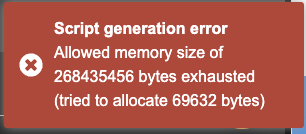
Script Generation error: Allowed Memory Size exhausted

I was trying to make an update to my script and I get this.
My script is quite huge but I never had any issues generating it. I tried deleting mappings to see if anything changed but I keep getting the error, even if the script is smaller than before.
Any help? Thx

Hi Jeeno, I don’t know this problem. But I had some success to solve problems by selecting all of the mappings and modes, export and re-import them. Maybe this solves also your problem ? Regards, mj


Make sure to tick all mappings & modes then export them.
You should be able to import everything into a fresh script without issue then.
Just make sure to attach the controller template to the new script.
Hi John. I tried to do that, I import the modes, then I import the mappings.
The issue is, when I import the mappings, for some reason the mappings are not assigned to the correct modes, it’s all mixed up… I’ve been trying to understand why this happens for days and no idea.
I also tried a lot of different things but nothing helps (order of exporting / importing, deleting some mappings/modes, etc.).
I could reassign all the mappings to the right modes one by one but it would take ages since the script is huge and the UI is also a bit clunky because of that.
Let me know if you have any other advice, thx a lot.
Sign up
User registration is currently not allowed.
Hey thanks for trying to help!
Sadly this doesn’t work in my case because all the connections between mappings and modes break when I try to save them after importing…