Show device parameter and value on controller display

Hi all, wondering if a more experienced script writer could help me with the following:
I would like to show the device name, parameter name and value on the display of my Launchkey mk4.
I’ve figured out what the sysex strings should look like and have integrated it in a reaction that listens to a controller knob. The code below works to a certain extent (device number is m1 and parameter number is m13).
The info is sent to the launchkey and displayed on the little screen. However, the reaction is triggered with every midi step of the controller knob. Any idea how I could avoid this? Especially the device name and parameter name should not be retriggered as long as the same midi message is being received. Also, somewhat related, the value is shown as a decimal number between 0 and 1: is it possible to send the value the way it is shown in Ableton (eg. EQ8 frequency in Ableton is ‘x Hz’, while the value sent is ‘0,xxxxxx’)?
Device = str(self.song().view.selected_track.devices[self.get_modifier_value(“m1”)].name)
Parameter = str(self.song().view.selected_track.devices[self.get_modifier_value(“m1”)].parameters[self.get_modifier_value(“m13”)].name)
Value = str(self.song().view.selected_track.devices[self.get_modifier_value(“m1”)].parameters[self.get_modifier_value(“m13”)].value*10)[:3]
self._send_midi((240, 0, 32, 41, 2, 19, 4, 33, 2, 247))
self._send_midi((240, 0, 32, 41, 2, 19, 6, 33, 0) + tuple(Device.encode(“ascii”)) + (247,))
self._send_midi((240, 0, 32, 41, 2, 19, 6, 33, 1) + tuple(Parameter.encode(“ascii”)) + (247,))
self._send_midi((240, 0, 32, 41, 2, 19, 6, 33, 2) + tuple(Value.encode(“ascii”)) + (247,))
self._send_midi((240, 0, 32, 41, 2, 19, 4, 33, 127, 247))

I’m guessing you’ll need a condition (“if” statement) that checks if the current midi message is from the same source as the last message.
for the Hz, I’m not sure how it’s calculated. If it’s linear, then you could simply multiply the value with the max. Hz amount; but my guess is it will be logarithmic (or is it exponential?), then it’s a different calculation. Would need to look into it.

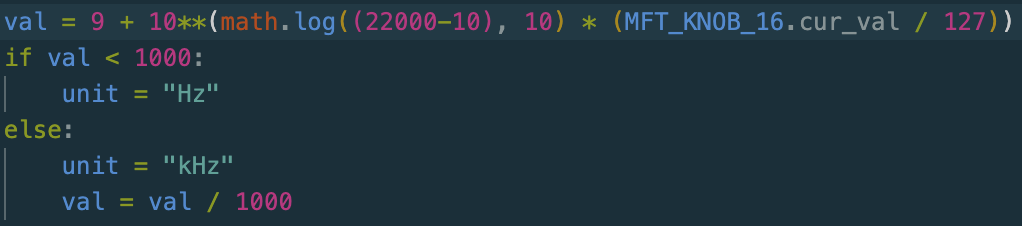
I don’t know how much this will help you with the conversion to Hz, but here’s my attempt (did some searching).
In Python ** means ‘exponent’, so everything inside parentheses after the 2 stars is the exponent of that 10 before the stars. Any number to the exponent of 0 (the lowest value for the exponent here) == 1; that’s why I’ve started the calculation with 9 because we want the minimum to start at 10 Hz.
To calculate the exponent of that 10, we multiply the logarithmic value of (22000 Hz minus the starting value of 10 Hz) with (the value between 0 and 1). In the picture above that value (between 0 and 1) was calculated as the MIDI value of a knob (knob 16 in this case) divided by 127.
The “if-else statement” below that is to convert the unit into “kHz” with once the outcome of that calculation is larger than 999 Hz.
Here’s the code:
import math

knob_value = 1 # replace the 1 with the parameter's value you get from ABLETON

val = 9 + 10**(math.log((22000-10), 10) * knob_value)

if val < 1000:
  unit = "Hz"
else:
  unit = "kHz"
  val = val / 1000

val = round(val, 2) # this rounds the value to 2 decimals
I made a few tweaks to the code:
- Change the 1 at the variable “knob_value” into the code that gets the value of the frequency parameter.
- Added a line at the end to round the val to 2 decimals.
Thank you for putting in the time and the energy Glenn. Much appreciated. You took it much further than I intended it to. I’ll experiment with it this weekend and see how far I get. I hope you got something out of it too ;;-)
I got a learning experience out of it. I recently discovered I could use MIDI controllers with python scripts through the PyGame module. Because of this I was able to test the code for the conversion easily with my own MFT.
There’s still a chance that the calculation won’t accurately depict the same value like in Ableton. Even though it’s increasing at exponential rate, the curve of that rate might be different from Ableton’s curve. I haven’t fully checked that.
Small update: I found the solution to the screen flickering. I was calling the wrong target with the sysex code. Should be 21 for knob 1, 22 for 2, etc…
self._send_midi((240, 0, 32, 41, 2, 19, 4, 21, 2, 247))
self._send_midi((240, 0, 32, 41, 2, 19, 6, 21, 0) + tuple(Device.encode(“ascii”)) + (247,))
self._send_midi((240, 0, 32, 41, 2, 19, 6, 21, 1) + tuple(Parameter.encode(“ascii”)) + (247,))
self._send_midi((240, 0, 32, 41, 2, 19, 6, 21, 2) + tuple(Value.encode(“ascii”)) + (247,))
self._send_midi((240, 0, 32, 41, 2, 19, 4, 21, 127, 247))
And concerning the way in which the value is presented on the Launchkey display: I noticed that there is another method in the Ableton API: Live.DeviceParameter.DeviceParameter.str_for_value()
This returns the value as it is in Ableton, eg. Hz or dB in the EQ8 example above. But at the moment I can only call the minimum and maximum values and nothing in-between. The official Novation script manages to show all values, so I’m probably still missing a piece of the puzzle.
In the meantime, I am sending the value as % of the maximum, and that’s already a big step forward. The visual feedback on the little display opens up the Ableton/Launchkey combo big time.
Another small update: str_for_value() needs to be called with a number between 0 and 1. E.g. 0.5 would give the label for the value of that specific parameter. By scaling the incoming cc velocity data, I get there. My little Launchkey screen now shows me all the info I want.
Sign up
User registration is currently not allowed.
Just took a look at the frequency of EQ Eight. It seems to go from 10 Hz to 22 kHz (i.e. 22.000 Hz). It seems to progress exponentially. I’m not a math specialist, so I can’t come up with a formula on the spot here.