Control mouse click with Python

Hi Remotify forum members,
I see that Remotify has a user.py script that can run methods (a python class), can I run python code here that I currently run in terminal?
I have a python script (that I run manually) that listen for a specific midi command (sent from a midi controller when a button is pressed), when this command is received it clicks the ‘Type’ area (see attached picture) in Ableton’s browser to activate it so that I can copy in clip packs from a folder to tracks (Deck A and B). I do this as I have no other way of Activating Ableton’s browser.
I’m a bit of a new beginner in scripting and with Ableton so I would like to know if it is possible before I spend to much time on it, is this something that can be done with Remotify and python?
These are my imports in my python script;
import argparse
import os
import signal
import sys
import time
import rtmidi
from pynput.mouse import Button, Controller as MouseController
from pynput.keyboard import Key, Controller as KeyboardController

I couldn’t see my added script so I’ll try again
Joachim
Edit.
I saw something that makes me think that Ableton Push can load files from the browser…. maybe it would make sense to take a look at a decompiled Push control scripts… would that make sense?
I know that would currently be way above me!
https://github.com/gluon/AbletonLive12_MIDIRemoteScripts/tree/main/Push
Hi remotify forum members,
I’m very slowly getting to grips with Abletons Control Surface (python) and I’m studding Max4Live’s LOM and trying out AbletonOSC to explore Abletons API but as a beginner this is very hard going.
From the Max4Live LOM and the reverse-engineer Python API I can see that it should be possible to browse Abletons Browser and select clips and clip packages and load them into Ableton session view just like Ableton Push can do.
My current question is about the way Remotify CSS’s interacts with LOM.
E.g. when I send this command to the AbletonOSC Control Surface
>>> /live/clip/get/file_path 0 0
it returns
0, 0, /Users/joachim/Documents/dance/Good DJ set/9A- E Minor/9a_124_Stranger Things Felix Cartal Project/Samples/Imported/Felix Cartal – Stranger Things.wav
From my understanding AbletonOSC it uses Live.Clip.Clip.file_path Property to get this information.
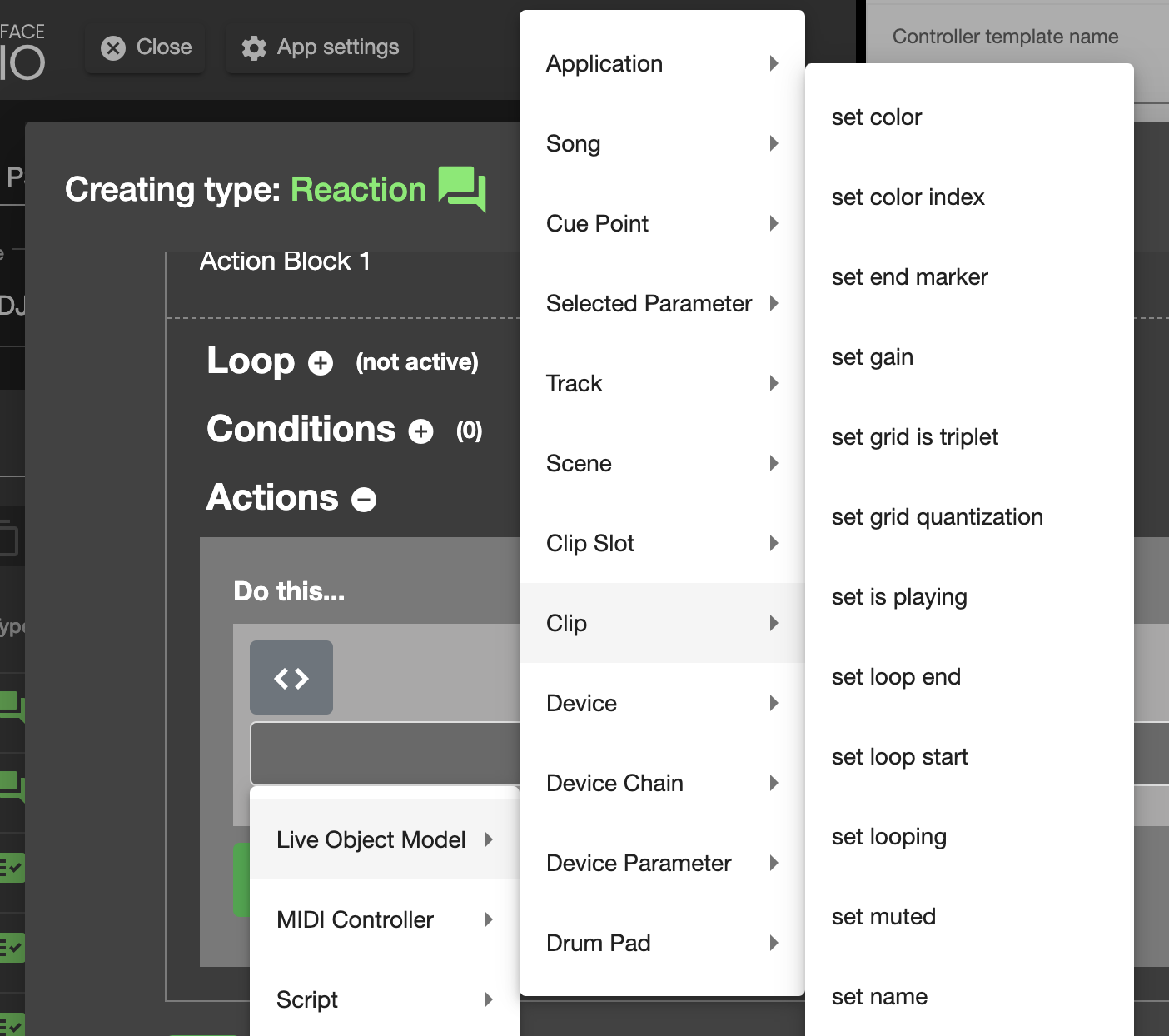
In Remotify CSS I see that from Reaction I can access many of the Clip set methods but I don’t see any get methods.
My question is, can I call get methods from Remotify CSS Reaction even though they are not listed?
I would try if myself but I’m having trouble understanding how to convert the API to code that would work
e.g how would I turn this into a get call that I could use with Remotify CSS
Live.Clip.Clip.file_path Property
Get the path of the file represented by the Audio Clip.
Clip API found here
Edit:
Small update, I found that I can get the Clip name if I leave out ‘= “”‘
Get Clip name
temp = self.song().tracks[0].clip_slots[0].clip.name
self.log_message(“csslog: ” + str(temp))Set Clip name (generated from remotify CSS GUI)
self.song().tracks[0].clip_slots[0].clip.name = “New Name”
Edit 2:
I found that I can also get the full file path of a clip
temp2 = self.song().tracks[0].clip_slots[0].clip.file_path
self.log_message(“csslog: ” + str(temp2))would give me something like this
/Users/joachim/Documents/dance/Good DJ set/9A- E Minor/9a_124_Stranger Things Felix Cartal Project/Samples/Imported/Felix Cartal – Stranger Things.wav

From what I learned, when using CSS’s menu’s:
- LOOP contains all the iterables
- CONDITIONS contain all the properties
- ACTIONS contain all the functions
(Although it’s worth mentioning that not all iterables, properties and functions that can be found in the API are found in these menu’s. But you can still use them with custom code.)
If you look inside the CONDITIONS menu, you’ll find “Clip” >>> “file_path”.
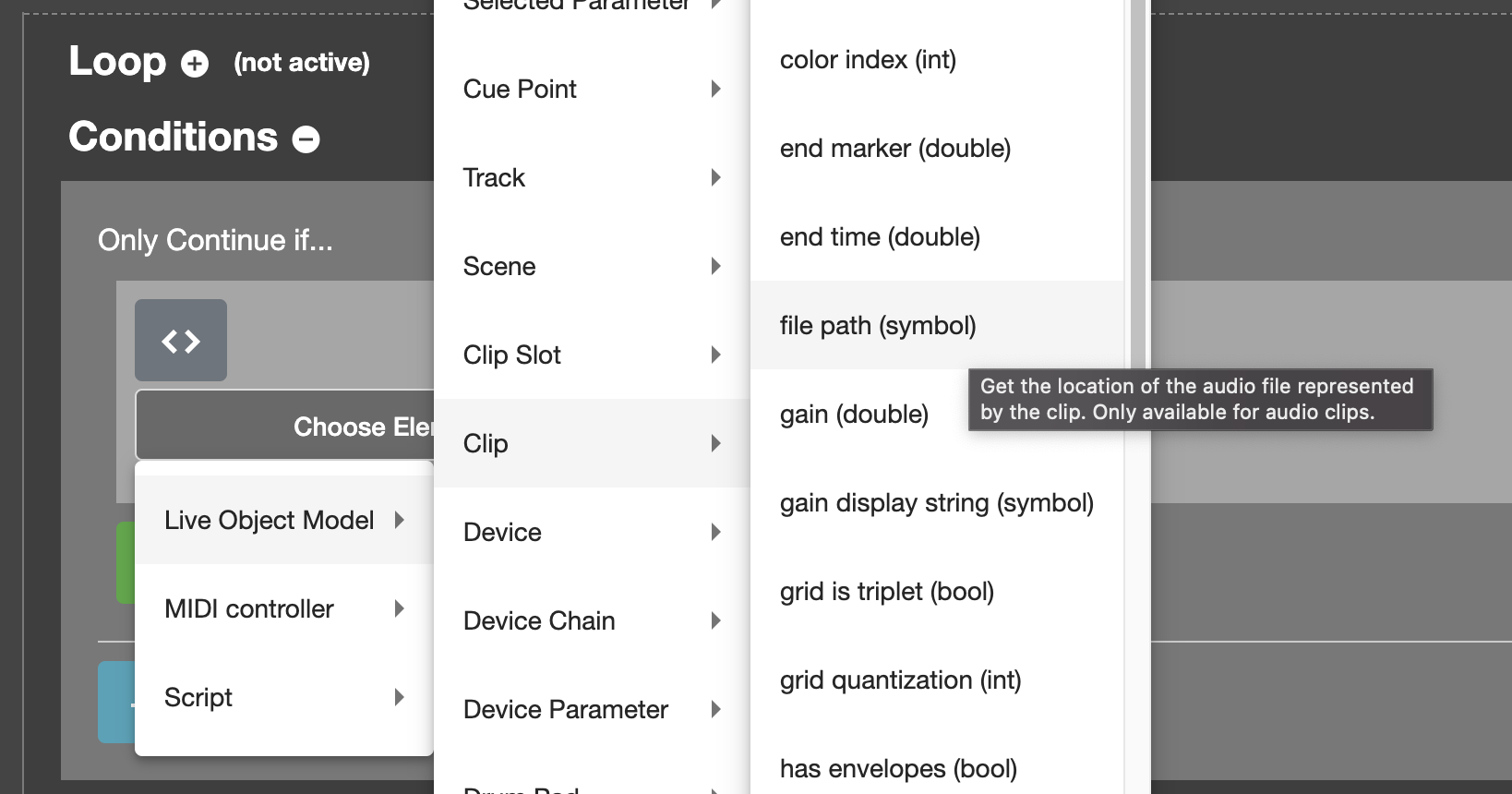
If you click this option, then the code that points to a file_path is presented under the condition. You can use CSS’s path menu (grey upward pointing hand) to point to a specific Clip, like the one in the Highlighted Clip Slot:
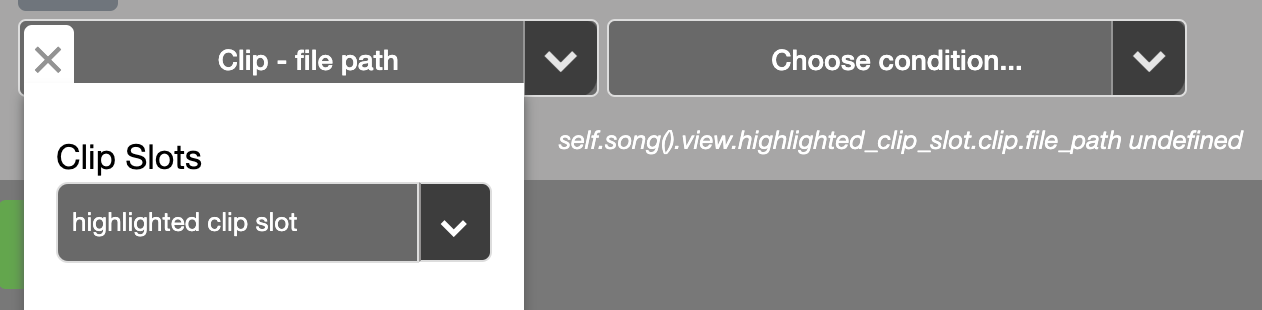
Then, to use this code in an Action, just copy the line of code into a Custom Code Action. This can either be done inline, like in the example below that prints the file_path in CSS’s log:
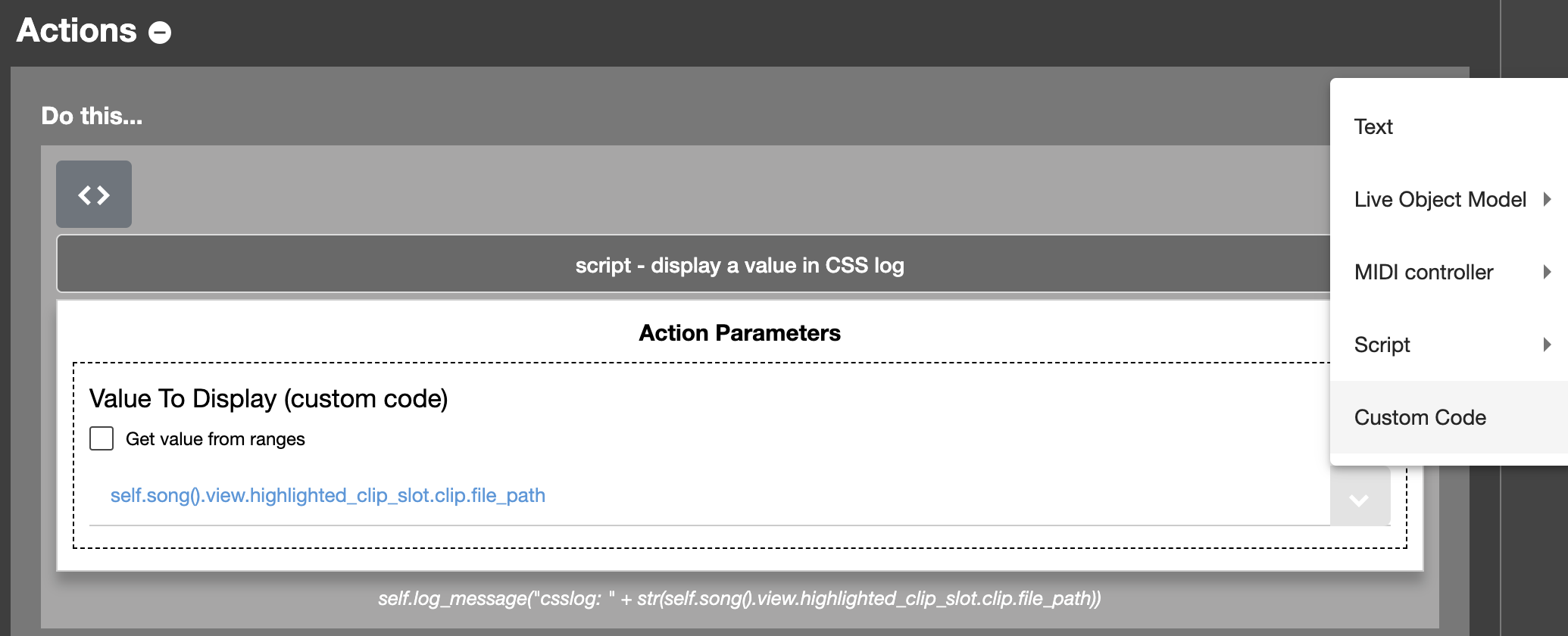
Or by clicking the Custom Code button “< >“; but then you’ll need to fully code the Action yourself. The example below just puts the file_path in a variable f, but doesn’t do anything with it:
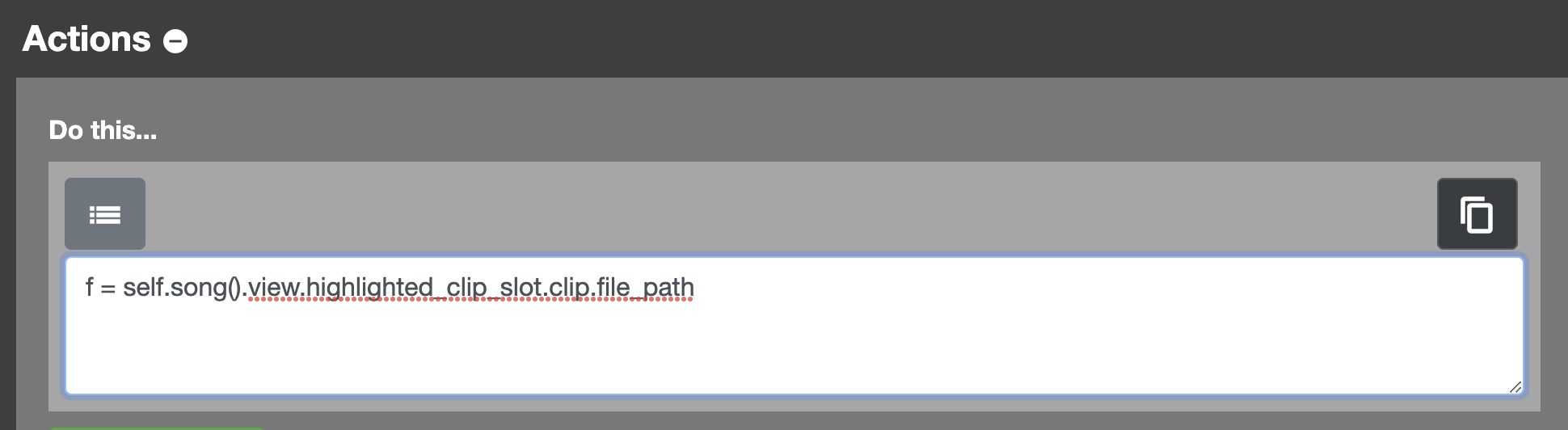
Don’t forget to remove the condition that was used to get the code, otherwise it will bring up errors.

So I can have my CSS select Ableton’s Browser, the browser gets selected and gets a black border but even though it is selected I need to click in the browser area with my mouse for my up, down, left and right navigation to work. It is like the Browser is selected but not the subpart of it where the folders are.
I have found that I can use alt + 5 hotkeys to activate the Browser (from Abletons menu Navigate -> Browser) and then my CSS Navigate Browser commands works.
Now I’m back to sending keys and key combinations (using Hammerspoon) in combination with a Control Script. I would like to only use Control Script, I understand Ableton has not / will not make the API official and that remotify CSS somewhat has its hands somewhat tied. I don’t know if what I want can be done (I think it can as Ableton’s Push has the capability to load clips and songs).
I have done a lot of digging, and I have looked at the decompiled Push script and I see things that might be useful, that is if I knew more python.
The interesting thing (or sad thing) is now that I have learnt enough (more or less) to do without CSS (as I have made some simple Control Scripts of my own).
As Remotify CSS is paid software (not open source/free) I hade hoped for some official feedback/help here on the forum but i have seen very little of that here on this forum.
So much for a tool that clams one can write Control Scripts without coding 🙁
Would it be possible to get some official response from Remotify.io? Is it possible to select the Browser, navigate folders, select clips or clip packs and copy into a track in session view? Maybe you could have a look at Ableton Push control script?!
Joachim
Code I have used that partially works:
This selects the Browser
self.application().view.focus_view(“Browser”)
Navigate Browser Up
self.application().view.scroll_view(0, “Browser”, None)
Navigate Browser Down
self.application().view.scroll_view(1, “Browser”, None)
Navigate Browser Left
self.application().view.scroll_view(2, “Browser”, None)
Navigate Browser Right
self.application().view.scroll_view(3, “Browser”, None)
Sign up
User registration is currently not allowed.
Good to know, thanks again!
Yet still a long way to go before i can do what i wanna do with Control Surface and a controller