CSS Version 2.6.3 is out – Add Notes and more…

Hi all and a Happy New Year from the Remotify Team!
We have just release version 2.6.3 which adds some great new pieces of functionality to the UI and improves on others:
New:
1. A section for writing notes has been added to the following forms:
– Script Settings Form
– All Mapping Type Forms
– Each Action Block in a Reaction
– Controller Template Settings Form
– All Controller Input Type Forms

2. Duplicate, Move up & Move down buttons are now available for the following sections inside the Reactions Mapping type:
– Action Blocks
– Reaction Conditions
– Reaction Actions

Improved:
1. The Log Menu now displays current size (in mb) of the log.txt file.
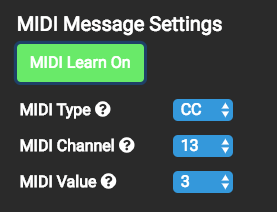
2. Midi Learn/Monitoring can now be turned on/off directly inside the ‘MIDI Message Settings’ section of a controller input
3. Removed on/off button inside MIDI Monitor menu. It is now always monitoring incoming midi signals (no longer displays a red dot when on).
4. Each script in he ‘script import section’ now shows a description, and a link to it’s webpage for more information.
Fixed:
1. In Reactions, all Device Parameter listeners have now been fixed. Previously they were generating incorrect code. See this comment in the forum for more details: https://remotify.io/community/question/looper-status-led-midi-feedback#comment-3056
2. In Reactions, the descriptions for all actions using ‘beats’ and similar action params was incorrect. These have now been updated. More details on this issue here: https://remotify.io/community/question/ableton-fixed-length-recording-without-push-it-possible#comment-2963

Hello Rodolfo,
I only have the PC version of v2.6.2, If you are on windows, mail me at hihim31455@nabajin.com, I will send you the file. It’s a temporary email since I don’t know Remotify’s policy about sharing files.
I also tried in both versions and I can not make it work. But then again, I don’t have that much experience in CSS, I might be doing something wrong.
Till soon.
Hi rodolfo,
Nothing changed between 2.6.2 and 2.6.3 with regards to the parameter banking mapping type.
However, we just tested this and yes found an issue with increment/decrement in parameter banking…
This has now been fixed (on the server) so if you re-install your script, it should now work for you.
Note:
2.6.2 can currently still be downloaded from here for a limited time:
Mac: https://remotify.io/releases/mac/ControlSurfaceStudio2.6.2.dmg
Win: https://remotify.io/releases/windows/ControlSurfaceStudio2.6.2.exe
Hello Rodolfo,
If I’m not mistaken, this is already possible in Remotify by using Modes.
I have a Reaction where I ‘lock’ my controllers to a device by pressing a button (for instance Mode 3). If I then change to another device or track, the controller stays locked to that first device (still in Mode 3).
😉
Hello rodolfo,
Short answer:
“get_device_chain_target error” -> John said about that: “If you get this error, create a new script, drag all of the modes/mappings into it and you should be good to go.”
About the parameters, I noticed that if you for example put in 15 in ‘Parameter Bank’, it would sometimes generate 14 parameters, generating that error. A workaround is to first put 14 in ‘Parameter Bank’, and then 15. (https://remotify.io/community/question/parameter-bank-bugcorrupts-script…)
Anyway John’s solution has always worked! 🙂
Sign up
User registration is currently not allowed.