Focusing on named device

Hello gurus,
I can’t figure out how to focus on a named device regardless his position in group/chain or not.
Any clue ?
Tutorial somewhere ?
Thx

Here’s how to set up a Reaction for it:
Loop
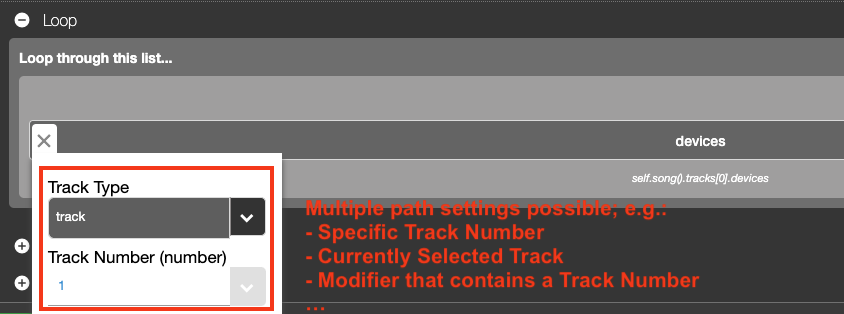
- Loop through all Devices
- Make sure to set the Track’s path to the Track you want to use this Reaction on. There’s multiple options possible.
Condition
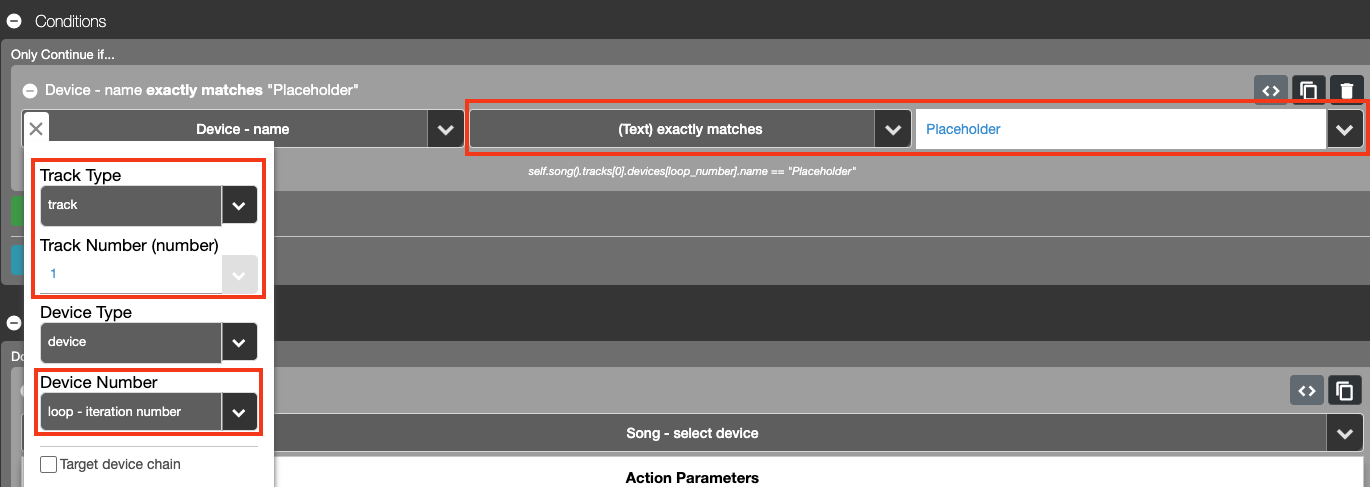
- Set up a condition that compares the “Device – Name” (In CSS 3 you can search for it but if you’re using CSS 2, it can be found at “Live Object Model > Device > All Devices > Name”)
- Set the Track’s pathing the same way as you did with the Loop.
- Set the Device Number in the Path Menu to “loop – iteration number”.
- For the rest of the Condition, exactly match the text to whatever name you want to focus on.
Action
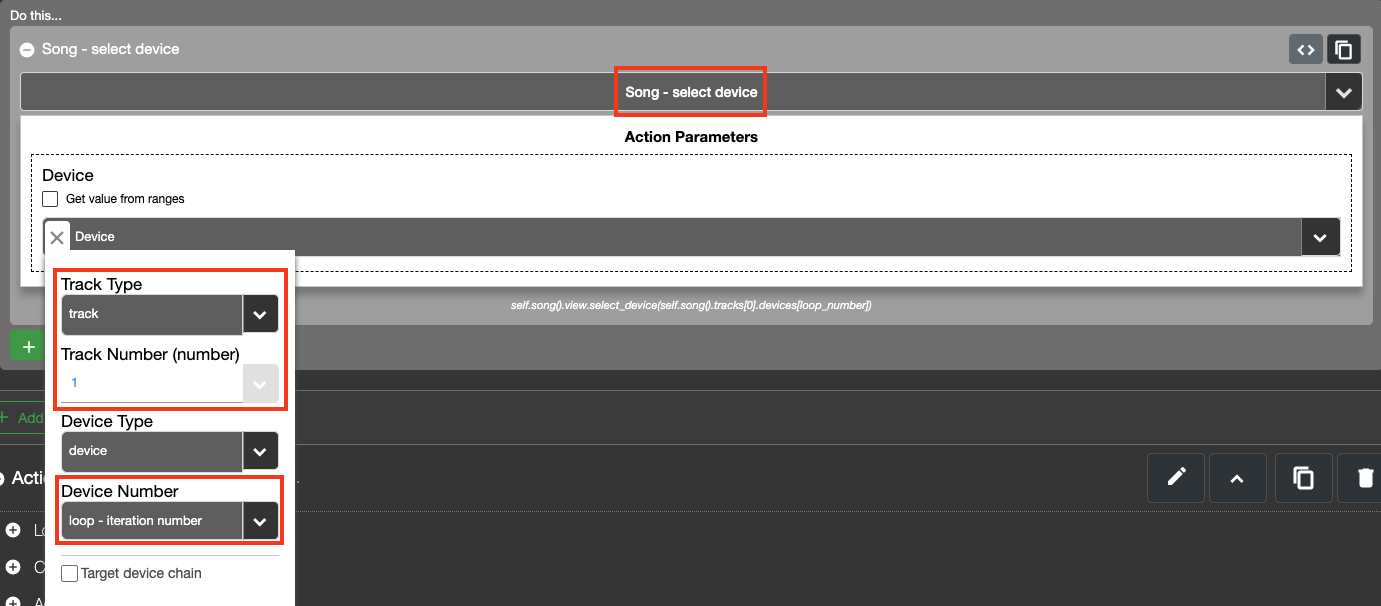
- Use the “Select Device” Action (if you’re still using CSS 2, it can be found at “Live Object Model > Song > Select Device”)
- Input the same Track pathing in the path menu + also set Device Number to “loop – iteration number”
Hi Glenn, thx a lot but it doesn’t work when the device is in group/chain except if you mention it previously.
Maybe I didn’t explain clearly what I want to achieve:
I already made a script to remote a named device whatever its position on the track. But if it is in a group, I loose the remote. The device is not viewed anymore.
I would like to keep in memory the directory of a device whether it is in the track or in a group or change position.
Btw, it will be my second problem to solve:
I already found a way to keep the position number (loop_number) in a list, but I can’t figure out how to keep the entire directory in memory in the form:
– self.song().visible_tracks[self.track_num(0)].devices[device_number] if the device is in the track
– self.song().visible_tracks[self.track_num(0)].devices[group_number].chain[chain_number].devices[device_number] if it is in a group
Do you think it is easier to achieve it in the CCS3 ?
Here’s in attachment what I did so far. I use the position number saved in list in other reactions to remote the device but it would be much better if I could save the entire directory…
Answering to myself it seems to be on the right way like this:
# Récupérer la première piste visible
track = self.song().visible_tracks[self.track_num(0)]
 # Fonction récursive pour chercher un device nommé "FIRST"
def find_first_device(devices, path_prefix):
    for index, device in enumerate(devices):
        device_name = str(device.name)
        current_path = f"{path_prefix}[{index}]"
         # Si le nom du device est "FIRST", on retourne son chemin
        if device_name == "FIRST":
            return current_path
         # Si le device contient des chaînes, on les explore
        if device.can_have_chains:
            for chain_index, chain in enumerate(device.chains):
                sub_devices = chain.devices
                sub_path_prefix = f"{current_path}.chains[{chain_index}].devices"
                result = find_first_device(sub_devices, sub_path_prefix)
                if result:
                    return result  # Si trouvé dans une chaîne
     return None  # Si rien trouvé
 # Lancer la recherche sur les devices de la piste
directory_first = find_first_device(track.devices, "self.song().visible_tracks[self.track_num(0)].devices")
 # Affichage dans les logs
if directory_first:
    self.log_message("csslog: FOUND FIRST at " + directory_first)
else:
    self.log_message("csslog: FIRST not found")

I’ll try to help think of a solution. It might take a bit of work to get what you’re looking after. Here’s some ideas off the top of my head:
The Visible Tracks list has a variable number of Tracks in it, depending on what Tracks are visible. This means that Track positions might change if you fold/unfold a group. It also means Tracks within a group that’s folded won’t be included in this list.
If you want to use a track number that’s always the same no matter if it’s visible or not, then you should use the Tracks list. You’ll still run into trouble when you reposition Tracks or when you add or delete a Track.
You could set up code that searches through all tracks, their chains (if they have them) and their devices until it finds the device you’re looking for. Then save those index numbers (for track, chain and device). Whenever you fire the code again it could then first try to use the saved indices but if it doesn’t find the correct device, then you let the code search through everything again. If it still doesn’t find the device you’re looking for you can let the code show you an error message.
Don’t worry, I can live with what I have for now. If I move the device, I’ll just reload the script by changing track, or mode, and back.
Sign up
User registration is currently not allowed.
The limit of this method is the directory is not updated when you move the device in the chain or you move the chain itself… Because I can’t figure out how to set a dynamic Listener for this chain… Or at least a dynamic Listener for this named device.
The workaround is to put midi controllers as Listener. Moving a controller will relaunch the script…