New to the software, struggling to get started.


I am trying to set up two Intech Studio EN16 Modules to automatically connect to this Audio Effect Rack, so that 31 of the 32 encoders connect to the 31 bands on AUGraphicEQ and the final encoder connects to the gain on Utility. I want it to connect both on a selected Ableton track and within individual tracks within Drum Rack depending on what I have selected.
I followed the youtube tutorial and so far have only been able to get it to control macro 1 on the Audio Effect Rack.
Also ideally I’d like any information on the possibility of setting up the push buttons on the encoder to scroll through different velocities, i.e. -20db-0-20db on the EQ bands.

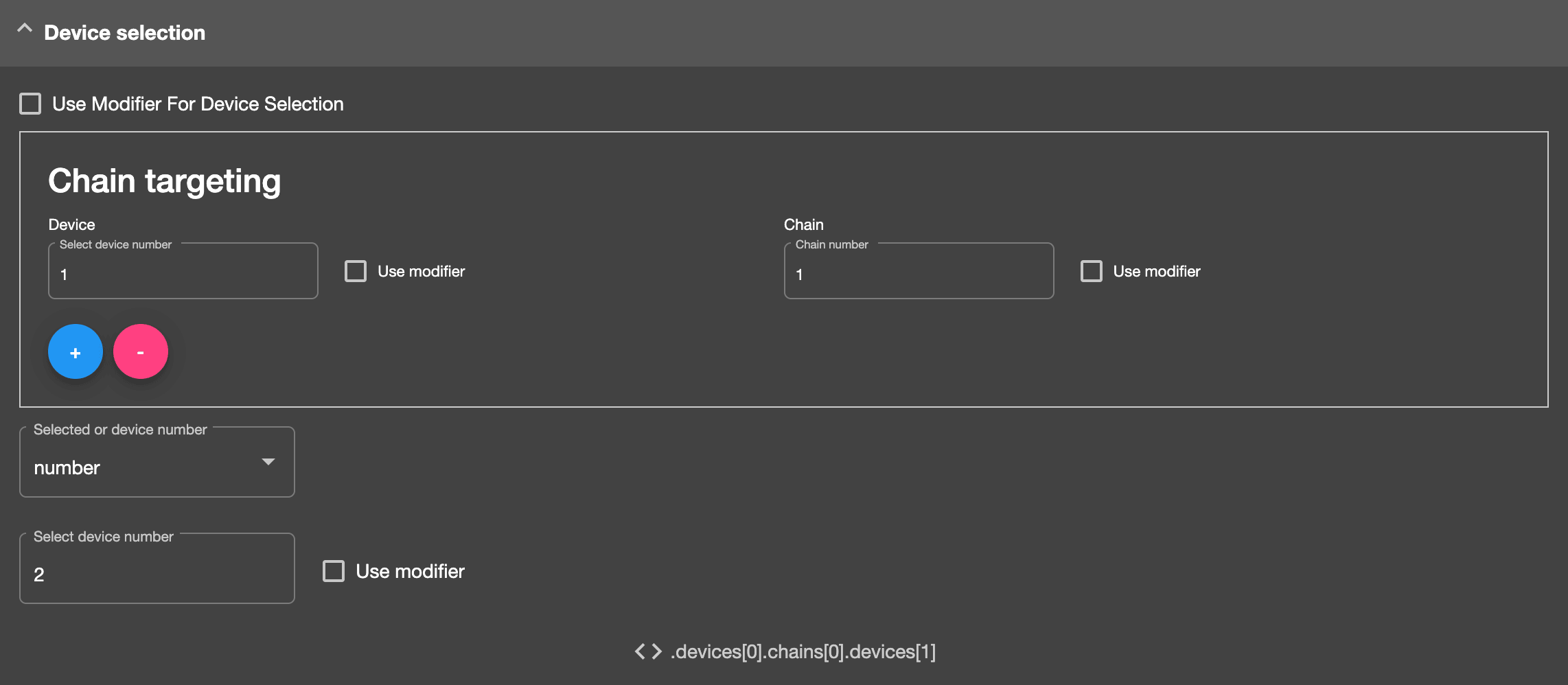
From your screenshot it looks its the second device in the first chain of the parent device.
So to control a parameter in there you would use the “chain targeting” section in a Device Parameter mapping.
See the settings in theis screenshot, that should target the device correctly (assuming the parent Device rack is the first device in the track device chain.
Also, you can do more advanced device targeting via Reactions.
Here’s info on how to target a device by name.
https://community.remotify.io/knowledge/control-a-device-parameter-by-device-name/
Sign up
User registration is currently not allowed.