Using code or Reactions you can get and set the value of your modifiers
Get the value of a modifier (Code Snippet)
self.get_modifier_value("m1")Returns the value of the modifier set in between the quotes “m1”.
Set the value of a modifier (Code Snippet)
This snippet can be used to set the value of a modifier.
self.set_modifier_value(“m1”, VALUE)
“m1” change this to the modifieryou want to set.
VALUE: change this to the number or string you want to set the modifier value to. If setting it as a string, wrap the string in quotes “value”. If setting it to a number, not quotes are needed.
Increase/decrease modifier value (Code Snippet)
To Increase / decrease the value of modifier, use a combination of the above 2 methods.
Example: increase the value of modifier m1 by 4:
self.set_modifier_value("m1", self.get_modifier_value("m1") + 4)Decrease the value of modifier m1 by 1 (note the + is changed to a minus just before the closing brackets):
self.set_modifier_value("m1", self.get_modifier_value("m1") - 1)Or, here’s an easier to read version of the increase by 4 example:
new_val = self.get_modifier_value(“m1“) + 4
self.set_modifier_value(“m1“, new_val)
Increase/Decrease the modifier value (Reaction Action)
Use the Action: script > modifiers - set value of modifier
Modifier: m1 (select the modifier to set the value to)
Value To Set: self.get_modifier_value(“m1“) + 4
Change ‘Value To Set’ to custom code. To do this click the down arrow on the right of the field and select ‘custom code’.
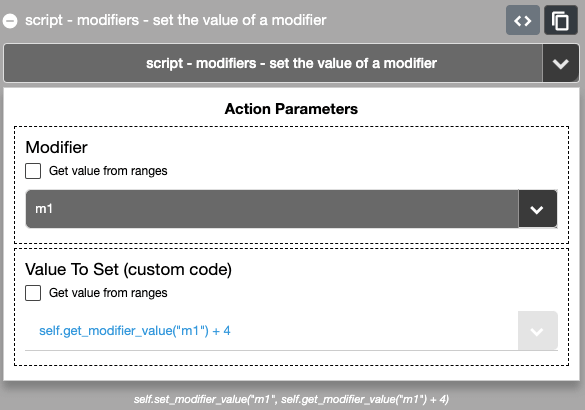
You can see at the bottom of the above screenshot that the code generated by the Reaction matches our first Increase example.